IPTV vs Cable: Which Is Better for UK Sports Fans?

Introduction — why this matters to UK sports fans

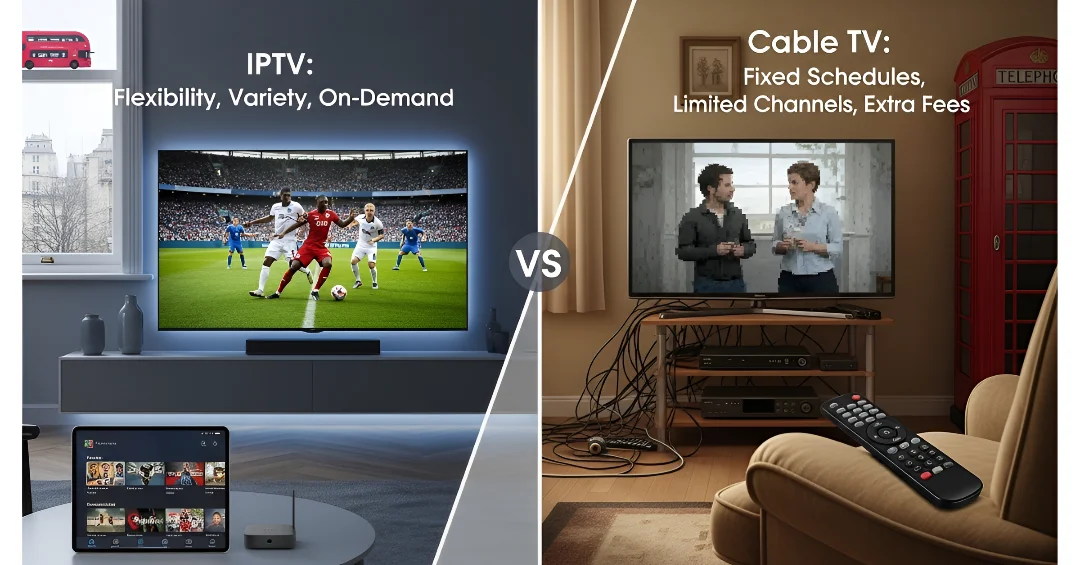
If you’re a sports fan in the United Kingdom, nothing is more frustrating than missing the last ten minutes of a match because your stream choked, or paying for an expensive cable package only to discover the tournament you want is locked behind another broadcaster. Over the last decade, IPTV UK and iptv subscriptions have emerged as attractive alternatives to traditional cable packages — especially for viewers who value flexibility and cost control. Yet cable still offers advantages: guaranteed carriage of Sky Sports, BT Sport, TNT/Warner rights (depending on season), and often more reliable customer support. UK Sports Streaming Showdown.

What is IPTV and what is cable? 

IPTV explained

IPTV (Internet Protocol Television) delivers TV channels and video over broadband. In the UK, IPTV offerings range from official services (broadcaster apps, managed ISP IPTV like BT TV, Sky Stream) to third-party IPTV providers who supply M3U/Xtream playlists that you play in apps like IPTV Smarters Pro or TiviMate. There are also legal OTT services (Netflix, Amazon Prime Video, NOW) that stream over IP but aren’t generally called “IPTV” by users.

Key terms you’ll encounter: iptv subscription, iptv uk free trial, iptv stream, iptv providers, and front-end apps like iptv smarters pro.

Cable explained

The Cable (and satellite) TV in the UK traditionally refers to services from providers such as Sky and Virgin Media, offering channel packages via coax or satellite distribution. Cable packages often include sports bundles (Sky Sports, BT Sport) and come with a set-top box, EPG, and a reliable dedicated service and customer support. UK Sports Streaming Showdown.

Key criteria for sports viewers

To decide which is better, evaluate these factors that matter most to sports fans:

1. Live coverage & blackout rules

Which provider holds rights to the competitions you follow? Premier League, UEFA competitions, Six Nations, Formula 1, cricket tours — rights move around. Cable providers often bundle major rights (Sky / BT / TNT historically), while IPTV lets you cherry-pick short-term passes (NOW Sports) or buy access from rights-holders.

2. Picture quality & latency

Sports require low latency and high quality. IPTV can deliver pristine HD and 4K when servers and your broadband are good. However, some IPTV streams (especially illegal ones) re-encode and add latency — which matters for live betting or social match timing. Cable generally provides stable, low-latency feeds. UK Sports Streaming Showdown.

3. Channel rights & availability

Cable’s strength is licensed carriage. IPTV’s strength is flexibility — but whether your chosen iptv provider includes Sky Sports legally is the key question.

4. Cost and flexibility

Cable often ties you to contracts or higher monthly bills. IPTV subscriptions can be cheaper and support “pay for a month” models — perfect for seasonal sports. Also consider trials: iptv uk free trial offers let you test compatibility.

5. Device support & ease of use

Cable boxes provide a plug-and-play experience with EPGs, while IPTV requires apps on Firestick, Android TV, Smart TVs or a browser. Apps like IPTV Smarters Pro and TiviMate can make IPTV feel like cable, but setup may be slightly more technical.

6. Reliability & customer support

If broadcast quality or uptime matters — for big finals — cable providers usually have stronger SLAs and support channels. IPTV providers vary widely in reliability. Licensed IPTV services (ISPs, major OTTs) are solid; smaller providers may be hit-or-miss. UK Sports Streaming Showdown.

IPTV advantages for sports fans

  • Cost control & modular buys: Buy short-term passes (NOW Sports) or rotate subscriptions seasonally — ideal for fans who don’t need year-round sport.
  • Flexibility: Stream on multiple devices (phone, tablet, Smart TV) and watch in more places.
  • Portability: Take your subscriptions with you while travelling within the UK or abroad (subject to geo-rules).
  • Aggregation: Use front-end players (IPTV Smarters, TiviMate) to centralise multiple playlists and VOD services — one UI for all sports channels.
  • Trialability: Many iptv providers offer iptv uk free trial or short passes so you can test before committing.

Cable advantages for sports fans

  • Guaranteed live access to major rights (when included in the package) — Sky Sports/Sky Sports Main Event etc.
  • Low-latency, high-quality feeds suitable for live-event-sensitivity (football stoppage time, live betting).
  • Reliable EPG & DVR: integrated recording, multi-room, and TiVo-like features.
  • Customer support & service-level guarantees: phone support, engineer visits, and stable set-top hardware.
  • Bundled value: home broadband + TV + phone bundles are often discounted.

Common myths and pitfalls (legal & security)

  • Myth: All IPTV is illegal. False. Many legitimate IPTV services exist (ISP IPTV, broadcaster apps). The legality depends on content rights.
  • Pitfall: Cheap IPTV equals savings. Beware of pirate iptv providers that resell unlicensed feeds. They may be unstable and illegal.
  • Myth: Cable is always more expensive. Not necessarily — deals and bundles can be cost-effective, especially for multi-room families.
  • Pitfall: VPNs fix everything. VPNs can help privacy and bypass geo-blocks but won’t turn illegal streams legal and sometimes conflict with provider T&Cs.

800-word step-by-step guide: Build the perfect IPTV sports setup

Below is a detailed, practical 800-word workflow to create a reliable, legal IPTV sports setup in the UK. Follow these steps to optimize picture quality, avoid illegal streams, and ensure you get the matches you care about.

Step 1 — Define exactly what you want to watch (15–30 minutes)

List leagues, competitions, and events you must have (e.g., Premier League, Champions League, Six Nations, F1, Test cricket). Write the primary ones (must-watch) and secondary ones (nice-to-have). This clarifies whether a cable pass (Sky/BT) or a seasonal IPTV/OTT pass is best.

Step 2 — Map rights to providers (30–60 minutes)

Research who holds rights in the UK for each competition — Sky, TNT/Warner, BT/UEFA deals, DAZN, Amazon Prime, BBC/ITV for highlights. Use official sources: broadcaster sites and Ofcom updates. Create a simple table: Competition → Rights holder → How to access (cable, NOW, Prime, ITV/ iPlayer, DAZN, or other).

Step 3 — Decide on legal pathway: cable bundle vs modular IPTV stack (30 minutes)

If most must-watch sports are on Sky and you want multi-room DVR, cable might be simplest. If you only watch sport seasonally (e.g., Premiership in winter), an iptv subscription + short NOW passes or Prime Channels could be cheaper. Choose the path that matches your rights map. UK Sports Streaming Showdown.

Step 4 — Choose devices & players (30–60 minutes)

For living-room viewing, pick a device that handles high-bitrate streams and codecs:

  • Smart TV with vendor apps (easy).
  • Fire TV Stick 4K Max (affordable, supports many players).
  • NVIDIA Shield for advanced users and AV1/HEVC decoding.
    Install front-end players: TiviMate (Android TV) for polished EPGs or IPTV Smarters Pro (Fire/Android) for flexible playlists. For official passes, use provider apps (NOW, Sky Go, BT Sport, Prime Video).

Step 5 — Secure a reliable broadband connection (15–30 minutes)

Sport needs consistent bandwidth. Aim for:

  • 4K: 25–50 Mbps per stream.
  • HD: 10–15 Mbps per stream.
    Use Ethernet for main TV if possible. Consider Wi-Fi 5GHz or mesh if multiple rooms stream simultaneously.

Step 6 — Choose trusted IPTV providers & passes (1–2 hours)

If going IPTV, select licensed providers or official passes:

  • NOW Sports (monthly Sky content).
  • Amazon Prime Video / Prime Channels (selected sport).
  • DAZN, BT Sport app, official rights-holder apps.
    Avoid anonymous M3U sellers. Verify company registration, payment methods (card/PayPal), and ask for trial access. Use iptv uk free trial where available to test stream reliability.

Step 7 — Configure player settings for best sports performance (30 minutes)

In TiviMate/IPTV Smarters or provider apps:

      • Enable hardware decoding (if device supports it).
  • Increase buffer moderately to prevent micro-stuttering (too large adds latency).
  • Set video resolution to adaptive (auto) so the app reduces bitrate when network drops.
  • Enable low-latency mode if available — some players let you prioritise latency over buffer.

Step 8 — Test extensively before match time (1–2 hours)

Run live stream tests during peak evening times to simulate real conditions. Test multiple channels, check audio sync, and verify multi-device simultaneous streaming. If issues appear, contact provider support or switch to fallback streams.

Step 9 — Prepare backups & contingency (15–30 minutes)

Have backup options: alternative legal streams (highlights on iPlayer), a mobile stream (data plan), or a friend with cable access. Keep app logins handy and enable notifications for match alerts.

Step 10 — Match-day checklist (15 minutes before kickoff)

  • Reboot router & player earlier in the day.
  • Close other heavy network apps (downloads).
  • Plug main TV into Ethernet, or ensure strong 5GHz Wi-Fi.
  • Open the match channel 10–15 minutes before kickoff to stabilise the buffer.

Maintenance & ongoing hygiene

Update apps & firmware monthly. Re-run speed tests. If reliability drops often, escalate to provider support or consider switching to a cable pack during peak seasons.

Case studies / example setups

Budget student / flatshare

  • Stack: Broadband in halls + Fire TV Stick + Netflix/Prime + NOW Sports for Boxing Day/Big Matches.
  • Why it works: Low monthly cost, portable, and flexible.

Family with kids

  • Stack: Virgin Media or BT bundle with Sky Sports (if regular sports) OR IPTV modular stack (Freeview Play + Netflix + NOW Sports seasonally).
  • Why it works: Multi-room, easy parental controls, DVR.

Serious fan / multi-room household

  • Stack: Sky Q or Sky Stream for core rights + Prime/DAZN for extras; or a robust IPTV provider + NVIDIA Shield + dedicated 4K TV + Ethernet.
  • Why it works: Lowest latency, multi-room coverage, recording.

How to choose between IPTV and cable for your needs

Answer these questions:

  1. Which rights do you need? (map to providers)
  2. Do you want year-round access or seasonal passes?
  3. How many simultaneous streams/devices?
  4. How important is low latency and DVR?
  5. Are you comfortable managing apps and playlists?

If you want simplicity and guaranteed access to Sky/BT rights, cable wins. If you want flexibility, lower cost, and device portability, IPTV (via official passes) is likely better.

Troubleshooting & optimisation tips

  • Use Ethernet for main TV to avoid Wi-Fi congestion.
  • Lower resolution from 4K to 1080p if buffering occurs.
  • Clear app caches monthly and keep firmware updated.
  • Use QoS on routers to prioritise your TV device.
  • If using IPTV Smarters Pro/TiviMate, enable hardware decoding and tweak buffer values.

Conclusion — the verdict

There is no single “best” answer. For many UK sports fans, a hybrid approach is the winner: use cable (Sky/BT) when rights and DVR matter most, and supplement with IPTV subscriptions (NOW, Prime Channels, DAZN) during seasonal peaks. IPTV offers unmatched flexibility and cost savings, while cable provides stability and seamless access to bundled rights. UK Sports Streaming Showdown.

If you’re budget-conscious and tech-savvy, build a legal IPTV stack with reputable passes and a robust device (Fire TV Stick 4K Max or NVIDIA Shield). Conversely, if you want plug-and-play reliability and comprehensive rights in one place, consider cable bundles.

FAQs

Q1 — Is IPTV legal in the UK?
A: Yes — many IPTV services are fully legal (broadcaster apps, ISP IPTV, official OTT passes). Legality depends on whether the provider has distribution rights. Avoid anonymous sellers offering thousands of channels cheaply.

Q2 — Can IPTV match cable picture/latency for live sports?
A: Yes — licensed IPTV and OTT services can match cable quality, provided you have sufficient broadband and a reliable provider. Avoid low-cost pirate streams that re-encode poorly.

Q3 — Are there free IPTV options for sports?
A: Free options (iPlayer, ITVX, All 4) provide highlights and some live events but not all premium sports. For major leagues, you’ll need paid rights-holder services.

Q4 — What devices are best for IPTV sports?
A: NVIDIA Shield (power users), Fire TV Stick 4K Max (best value), Chromecast with Google TV, or Smart TVs with official apps. Use Ethernet when possible.

Q5 — Should I use a VPN with IPTV?
A: VPNs offer privacy and can help with geo-restrictions, but they don’t legalise pirated streams and may affect latency. Use reputable VPNs and follow provider terms.

How to Choose the Best IPTV Service for Your Home

TV entertainment has evolved beyond the traditional cable box and satellite dish. In 2025, IPTV (Internet Protocol Television) is transforming how we watch TV in the UK and across the world. Choosing Best IPTV Service. Whether you want to enjoy your favorite sports, movies, or international channels, IPTV brings all of it directly to your home over your broadband connection.

But with hundreds of IPTV providers out there, how do you pick the best one for your household? That’s exactly what this detailed guide will help you figure out.

What Is IPTV and How Does It Work?

IPTV stands for Internet Protocol Television, which simply means TV content streamed through the internet rather than via traditional broadcasting methods like satellite or cable.

Instead of tuning into a frequency, IPTV UK sends video data through your broadband connection, allowing you to watch live TV, on-demand shows, or even pause and replay programs whenever you like.

IPTV typically includes three main formats:

  1. Live TV: Watch real-time broadcasts similar to regular television.
  2. Video on Demand (VOD): Access movies and shows from a library anytime.
  3. Time-shifted TV: Catch up on programs you missed earlier in the week.

IPTV vs Traditional TV: What’s the Difference?

While traditional TV relies on physical infrastructure like satellite dishes or coaxial cables, UK IPTV runs entirely through your internet connection.

Here’s a simple comparison:

FeatureIPTVCable/Satellite TV
Delivery MethodInternetPhysical Cables/Dish
FlexibilityWatch anywhere, anytimeLimited to TV set
CostUsually cheaperOften expensive bundles
Content OptionsGlobal + On-DemandLocal/Regional only
DevicesTV, mobile, laptop, tabletTV only


Benefits of IPTV for Home Entertainment

Why are more UK households switching to IPTV? Here are the top reasons:

1. Flexibility and Freedom

You can stream your favorite content from any device — Smart TV, laptop, or phone — as long as you have an internet connection.

2. More for Less

IPTV services are usually more affordable than traditional cable packages, and many offer month-to-month flexibility without long contracts.

3. Global Access

Want to watch international channels or regional shows from your home country? IPTV breaks the geographic barrier.

4. Personalized Viewing

You decide what to watch and when to watch it — not the broadcaster.

Important Things to Take Into Account While Selecting an IPTV Service

Not all IPTV providers are equal. Before signing up, here are crucial aspects to evaluate:

1. Internet Speed and Bandwidth

A good IPTV experience depends on a strong internet connection. Aim for at least 25 Mbps for HD and 50 Mbps for 4K streaming.

2. Channel Selection

Make sure the provider offers a mix of live TV, movies, sports, and entertainment channels that suit your preferences.

3. Content Quality

Resolution matters — 720p might look outdated on modern TVs. Look for providers offering Full HD, 4K, or even HDR content.

4. Device Compatibility

Your IPTV provider should support Smart TVs, streaming devices like Fire Stick, Android TV, Roku, and mobile apps.

5. Reliability and Uptime

A good IPTV service should have at least 99% uptime and minimal buffering.

6. Pricing and Subscription Options

Avoid long contracts unless you’ve tried the service. Choose providers with free trials, flexible plans, and refund guarantees.

Legal and Safe IPTV Providers

Avoid Pirated IPTV Services

While tempting, illegal IPTV services can lead to serious consequences — malware infections, poor quality streams, and even legal issues.

How to Identify Legitimate IPTV Services

  • They hold official content licenses
  • Offer secure payment methods
  • Provide customer support and refund policies

Stick with reputable, transparent IPTV services operating within UK or EU laws.

Evaluating IPTV Features

Electronic Program Guide (EPG)

A user-friendly EPG helps you navigate live channels and plan what to watch easily.

Video on Demand (VOD)

Look for IPTV providers offering a rich VOD library with regular updates.

Cloud DVR

This allows you to record your favorite shows and watch them later.

Multi-Screen Support

Families can stream different content on multiple devices simultaneously.

Compatibility with Devices

Your IPTV experience should work seamlessly across all your gadgets.

  • Smart TVs: Look for native IPTV apps or easy installation options.
  • Fire Stick / Android Box: These are the most popular IPTV devices in the UK.
  • Mobile & Tablets: Apps for iOS and Android ensure entertainment on the go.
  • PC & Laptop: Browser-based streaming or dedicated software options.

Customer Support Matters

Reliable customer service makes all the difference. Look for IPTV providers offering:

  • 24/7 live chat support
  • Ticket or email system
  • Active community groups or forums

Good support ensures quick resolution for technical issues or account problems.

Reading Reviews and Community Feedback

Before committing, do your research. Visit:

Real users share valuable insights on reliability, stream quality, and support responsiveness. Choosing Best IPTV Service.

Comparing IPTV Subscription Plans

Monthly vs Yearly

Monthly plans offer flexibility, while yearly plans often save money in the long run.

Free Trials

A good IPTV provider should let you test their service risk-free.

Refund Policy

Choose providers offering at least a 7-day money-back guarantee.

IPTV and Internet Connection

Avoid Buffering

  • Use a wired Ethernet connection for stability.
  • Avoid overcrowded Wi-Fi channels.
  • Use a VPN if your ISP throttles IPTV traffic .

A strong, stable connection ensures lag-free entertainment.

Security and Privacy

Your online safety matters. IPTV services handle sensitive data, so:

  • Use strong passwords.
  • Enable VPN protection to hide your IP address.
  • Avoid sharing login credentials across unknown devices.

Popular IPTV Services in the UK 

Here are some well-rated IPTV providers (legally licensed and reliable):

  • BT TV – Offers IPTV via broadband bundles.
  • Sky Stream – No dish required, all over the internet.
  • Virgin Stream – Combines IPTV and on-demand streaming.
  • Netgem TV – Affordable packages with Freeview integration.

Each of these services focuses on user experience, quality, and legality.

The Future of IPTV in Home Entertainment

The future of IPTV looks brighter than ever:

  • 5G and Wi-Fi 6 will make streaming ultra-smooth.
  • AI-based recommendations will personalize viewing even more.
  • Cloud-based delivery will replace physical broadcast infrastructure.

In short, IPTV isn’t just the present — it’s the future of how homes watch television.

Conclusion

Choosing the best IPTV service for your home depends on your lifestyle, preferences, and budget. Look for reliability, content variety, legality, and great support. With fast broadband and smart devices, you can enjoy an unbeatable viewing experience that’s cheaper, smarter, and more flexible than ever.

So, before subscribing, test a few providers, read reviews, and ensure your chosen IPTV service truly fits your household’s needs. Choosing Best IPTV Service.

FAQs

  1. Do I need super-fast internet for IPTV?
    Not necessarily — 25 Mbps for HD and 50 Mbps for 4K streaming is sufficient for most homes.
  2. Is IPTV legal in the UK?
    Yes, as long as you subscribe to licensed IPTV providers that have the right to broadcast the content.
  3. Can I use IPTV on multiple devices?
    Yes! Most IPTV services support multiple screens for family members.
  4. What’s the best IPTV device for UK homes?
    The Amazon Fire Stick and Android TV boxes are currently the most popular for IPTV streaming.
  5. Can IPTV replace my cable subscription completely?
    Absolutely! IPTV offers more flexibility, lower cost, and global content without the limitations of traditional cable TV.                                                                                                                                      IPTV FREE TRIAL

IPTV Explained: What It Is and Why Everyone’s Switching

Television is undergoing a transformation like never before. Gone are the days when watching TV meant sitting in front of a cable box or waiting for your favourite show to air. IPTV: Definition and Trend. In the UK, households are embracing IPTV (Internet Protocol Television) — a revolutionary way to watch live channels, movies, and series through the internet.

The trend isn’t slowing down. From students in shared flats to families cutting the cable cord, IPTV has become the go-to solution for flexible, affordable, and high-quality entertainment. Let’s dive deep into what IPTV is, how it works, and why it’s changing the face of UK television forever.

What Is IPTV?

Internet Protocol Television is the fundamental acronym for IPTV. Rather than using satellite signals or terrestrial broadcast towers, IPTV delivers TV content through your internet connection.

Think of it this way — instead of watching what’s being broadcast live at a specific time, you’re streaming the content directly over the web, much like how Netflix or YouTube works.

Unlike traditional TV, IPTV lets users choose what to watch, when to watch it, and even on which device they want to watch — be it a TV, laptop, tablet, or smartphone.

How IPTV Works

IPTV uses your broadband connection to transmit digital TV signals through a process known as packet switching. Instead of sending a single continuous stream like traditional broadcasting, IPTV sends small packets of data that are reassembled by your device in real-time. IPTV: Definition and Trend.

Here’s a simplified breakdown:

  1. You select a channel or video on your IPTV app or device.
  2. The IPTV server streams that content via the internet using IP (Internet Protocol).
  3. Your device decodes the signal and displays it instantly.

To make this possible, IPTV uses servers, middleware, and a content delivery network (CDN) to ensure smooth playback, reduced buffering, and consistent quality.

Types of IPTV Services

1. Live IPTV

This is similar to traditional TV — channels are broadcast live over the internet. Sports, news, and entertainment channels are the most common.

2. Video on Demand (VOD)

VOD lets you choose and stream any movie or TV show at any time. Think of it as your personal Netflix-style library.

3. Time-Shifted TV

Missed a show that aired last night? Time-shifted IPTV UK allows you to watch programs that were recently broadcast.

4. Catch-Up TV

Catch-up services let you re-watch previously aired episodes, perfect for binge-watchers who missed live broadcasts.

Why Everyone’s Switching to IPTV

The shift from cable to IPTV isn’t just a trend — it’s a reflection of how modern audiences consume content.

  • Cost-Effective: IPTV subscriptions are often much cheaper than Sky or Virgin bundles.
  • Freedom of Choice: No more rigid channel packages — pick only what you want.
  • Multi-Device Access: Stream on your TV, phone, tablet, or even laptop.
  • Global Reach: Access channels from around the world, not just the UK.

In short, IPTV gives you complete control over your viewing experience.

IPTV vs Traditional Cable and Satellite

Traditional TV relies on rigid broadcast schedules and expensive hardware installations. Conversely, IPTV removes the requirement for:

  • Dish antennas
  • Complex wiring
  • Expensive monthly fees

Instead, you just need a stable internet connection.

IPTV also allows personalisation — from choosing your favourite genres to recording shows or skipping ads. It’s television that finally adapts to the viewer, not the other way around.

Benefits of IPTV

  1. 4K Ultra HD Streaming
    IPTV platforms are optimised for modern TVs, offering crisp visuals and superior sound quality.
  2. No Contracts or Hidden Fees
    Many IPTV services are month-to-month, meaning no long-term commitments.
  3. Access on the Go
    Travelling abroad? Take your IPTV service with you — all you need is an internet connection.
  4. Interactive Features
    Pause, rewind, or record live content — IPTV gives you the freedom to control playback in ways cable never could.

Popular IPTV Platforms in the UK

Legal IPTV services are growing in number. Some of the most recognised ones include:

  • BBC iPlayer
  • NOW TV
  • Amazon Prime Video (Live Channels)
  • ITVX
  • Sky Stream

These platforms combine live TV, on-demand libraries, and premium content — all accessible through apps or smart TVs. IPTV: Definition and Trend.

IPTV for Different Audiences

Students

Affordable, flexible, and mobile-friendly — perfect for dorms and small apartments.

Retirees

Easy access to favourite UK channels, documentaries, and classic films.

Families

Multi-device streaming allows parents and kids to watch different content simultaneously.

Sports Fans

Watch Premier League, cricket, or F1 live from anywhere, often in 4K.

How to Set Up IPTV at Home

  1. Check Internet Speed: At least 15 Mbps is recommended for HD, and 25 Mbps for 4K.
  2. Select a device, such as an Android Box, Fire Stick, Smart TV, or smartphone.
  3. Install IPTV App: Apps like TiviMate, Smart IPTV, or your provider’s official app.
  4. Connect to IPTV Provider: Enter your subscription credentials, and start streaming.

Setup usually takes less than 10 minutes — far easier than installing a satellite dish!

Legal and Safety Considerations

In the UK, IPTV itself is completely legal, but using unlicensed IPTV services is not.

Stick to verified providers that have official broadcasting rights. Illegal IPTV may:

  • Expose you to malware
  • Get your IP address flagged
  • Lead to penalties or legal issues

Always choose services that comply with UK broadcasting regulations. IPTV: Definition and Trend.

The Role of Internet Speed and Connectivity

Your IPTV experience depends heavily on your internet speed.
To ensure smooth streaming:

  • Use Ethernet cables instead of Wi-Fi for stability
  • Upgrade to Wi-Fi 6 routers for better performance
  • Choose a broadband plan offering at least 25 Mbps

The Future of IPTV in the UK

The future is bright — and digital. With 5G networks, AI-driven recommendations, and smart home integration, IPTV will only get better.

Imagine your TV learning your preferences, automatically suggesting what to watch next, or syncing with your home assistant for voice-controlled streaming. That’s where IPTV is headed.

Common Myths About IPTV

  • The statement “IPTV is illegal” only applies to unlicensed providers. Legal IPTV platforms operate safely.
  • “You need a special box” – Many modern TVs and phones can stream IPTV directly .
  • “It’s complicated” – Most IPTV apps are plug-and-play, designed for everyday users.

Conclusion

IPTV isn’t just a new way to watch TV — it’s a complete reimagining of the television experience. It gives viewers control, flexibility, affordability, and endless entertainment options.

With the UK rapidly embracing digital-first living, it’s no surprise that IPTV is becoming the future of television. Whether you’re a sports lover, movie buff, or family viewer, IPTV delivers everything you need — when and where you want it. IPTV: Definition and Trend.

FAQs

  1. What devices can I use for IPTV?
    You can use smart TVs, Android boxes, Fire Sticks, computers, and smartphones.
  2. Is IPTV legal in the UK?
    Yes, as long as you use licensed providers that have distribution rights.
  3. How fast should my internet be for IPTV?
    Minimum 15 Mbps for HD, and 25 Mbps for 4K streaming.
  4. Can I watch live sports on IPTV?
    Absolutely. Many IPTV services offer live sports channels, including Sky Sports and BT Sport.
  5. What’s the best IPTV provider in the UK?
    BBC iPlayer, NOW TV, and Sky Stream are among the most popular legal choices.                                                                                                                                                                                                                                                                    IPTV FREE TRIAL

The Ultimate Guide to IPTV in the UK

Television has undergone a dramatic transformation in the last two decades. Complete UK IPTV Guide. From the early days of analogue broadcasts to digital switchover, and now to internet-based streaming, the UK viewing landscape has never been more diverse or accessible. At the heart of this revolution lies IPTV (Internet Protocol Television) — a technology that has quietly, yet powerfully, reshaped how millions of Britons watch TV.

In this comprehensive 5,000-word guide, we’ll break down everything you need to know about IPTV in the UK — what it is, how it works, the benefits and drawbacks, the best services, legal considerations, and what the future holds for streaming-based television. Whether you’re a family thinking of cutting the cord, a sports fan chasing HD live matches, or a retiree looking for affordable entertainment, this is your complete IPTV handbook for 2025.

1. What Is IPTV? Understanding the Basics

1.1 The Definition

IPTV (Internet Protocol Television) refers to the delivery of television programmes, movies, and live broadcasts over the internet rather than through traditional terrestrial, cable, or satellite formats.

In simple terms, IPTV uses your broadband connection to stream content directly to your TV, smartphone, tablet, or computer. This means you’re no longer limited to specific broadcast times or cable connections — you can watch what you want, when you want, from anywhere with internet access.

1.2 The Key Difference from Traditional TV

Traditional TV relies on broadcast signals transmitted via:

  • Terrestrial networks (like Freeview)
  • Satellite (like Sky)
  • Cable (like Virgin Media)

IPTV, however, streams over the internet — no dish, coaxial cable, or aerial required.

This distinction makes IPTV uk more flexible, interactive, and scalable, allowing users to enjoy not just live television but also:

  • Video on Demand (VOD): Watch movies, box sets, and shows anytime.
  • Time-shifted TV: Catch up on missed programmes.
  • Live Streaming: Enjoy real-time broadcasts of sports, news, and events.

2. How IPTV Works: The Technical Breakdown

While IPTV may sound complex, the underlying system is straightforward once broken into parts.

2.1 The Process Step by Step

  1. Content Acquisition – Broadcasters and IPTV providers obtain TV programmes and films through licences or partnerships.
  2. Encoding & Compression – The content is converted into digital data packets suitable for streaming.
  3. Transmission – These packets are sent via the internet using a Content Delivery Network (CDN).
  4. Playback – The IPTV app or device decodes the packets and plays them on your screen in real-time.

2.2 The Types of IPTV Services

There are three main types of IPTV services in the UK:

TypeDescriptionExamples
Live IPTVReal-time streaming of TV channels over the internetBBC iPlayer live, Sky Go, Pluto TV
VOD (Video on Demand)Choose any show or movie to watch at any timeNetflix, Disney+, Amazon Prime Video
Time-Shifted TVReplay recently aired showsITVX, All 4, BBC iPlayer catch-up

Most IPTV providers offer a combination of all three for a complete experience.

3. Why IPTV Is Growing So Fast in the UK

The UK has become one of Europe’s most mature IPTV markets, with millions of users now relying on it as their main source of entertainment. There are several reasons for this rapid growth.

3.1 High-Speed Internet Access

With the rollout of fibre broadband and 5G mobile networks, UK households now enjoy faster, more reliable internet connections — making HD and even 4K streaming smooth and stable.

3.2 Demand for Flexibility

Traditional TV schedules no longer fit modern lifestyles. People want to watch content on their own terms, across multiple devices. IPTV enables on-demand and multi-device streaming, making it ideal for the modern, mobile UK viewer.

3.3 Cost Efficiency

IPTV subscriptions often cost a fraction of cable or satellite packages. While Sky or Virgin may charge £60–£100/month, IPTV services can range from £10–£30/month with similar — or greater — content offerings.

3.4 Global and Niche Content

Unlike traditional TV, IPTV gives access to international channels, niche genres, and special-interest content that’s often unavailable elsewhere — from sports leagues to foreign dramas.

3.5 The “Cord Cutting” Movement

A growing number of UK households are “cutting the cord” — cancelling expensive Sky and Virgin contracts in favour of IPTV, streaming boxes, and apps. This trend mirrors what’s already happened in the US and is accelerating as more UK viewers discover IPTV’s advantages.

4. Types of IPTV Devices and Apps

IPTV can be accessed through a wide variety of devices. Here’s an overview:

4.1 Smart TVs

Most new Smart TVs (Samsung, LG, Sony, etc.) have IPTV apps pre-installed or available for download — such as TiviMate, Smart IPTV, IPTV Smarters , or Perfect Player.

4.2 Streaming Devices

Compact, affordable, and portable — these are among the most popular ways to access IPTV:

  • Amazon Fire Stick / Fire TV
  • Apple TV
  • NVIDIA Shield
  • Android TV Boxes
  • Chromecast with Google TV

4.3 Mobile and Desktop Apps

IPTV apps are available for:

  • Android / iOS smartphones
  • Windows / macOS PCs
  • Web browsers (for direct access via URLs or M3U links)

4.4 Set-Top Boxes

Some users prefer dedicated IPTV boxes that support EPG (Electronic Programme Guides), HD/4K output, and parental controls.

5. Legal vs Illegal IPTV: What You Need to Know

5.1 Legal IPTV

Legal IPTV services are fully licensed to distribute the content they offer. Examples include:

  • BBC iPlayer
  • ITVX
  • All 4
  • NOW TV
  • Amazon Prime Video
  • Netflix
  • Pluto TV
  • Samsung TV Plus

These services operate within UK broadcasting and copyright laws.

5.2 Illegal IPTV

Unlicensed IPTV providers often sell access to premium channels (like Sky Sports or BT Sport) at low prices without permission. These illegal IPTV services:

  • Stream pirated content.
  • Expose users to malware or phishing attacks.
  • Can result in fines or legal action under the UK’s Copyright, Designs and Patents Act 1988.

5.3 How to Spot Illegal IPTV

Red flags include:

  • Offers of “All Sky Sports channels for £10/month”.
  • Payment only via Bitcoin or PayPal “friends and family”.
  • No verifiable company information or contact details.
  • Poor-quality streams or frequent outages.

Tip: Always choose licensed IPTV platforms to ensure safety, reliability, and legality.

6. IPTV and the UK TV Licence

The TV Licence remains a key consideration for UK viewers, even those using IPTV. Complete UK IPTV Guide.

6.1 When You Need a Licence

A current TV license is required if you:

  • Watch or record live TV on any channel (even via IPTV).
  • Watch BBC iPlayer, whether live or on demand.

6.2 When You Don’t

If you only stream on-demand content from services like Netflix, Disney+, or Amazon Prime (not live channels), a TV Licence is not required.

For example:

Watching Netflix = No licence needed.
Watching BBC News live on IPTV = Licence required.

7. Advantages of IPTV for UK Households

7.1 Cost Savings

With IPTV, you can ditch costly long-term contracts. Monthly subscriptions offer flexibility, often including thousands of channels and on-demand titles for under £30.

7.2 Accessibility Across Devices

Watch on your Smart TV, tablet, phone, or even while commuting — IPTV moves with you.

7.3 Personalised Viewing

Unlike traditional TV, IPTV platforms offer recommendation algorithms, watchlists, and profiles, tailoring entertainment to your tastes.

7.4 On-Demand Convenience

Pause, rewind, or replay shows instantly. Missed a match? Watch it later with catch-up TV.

7.5 Global Content

Access channels and shows from around the world — great for multilingual households or expats living in the UK.

7.6 Interactive Features

IPTV isn’t just passive viewing — it offers interactive guides, real-time stats for sports fans, and even in-app chat options during live events.

8. Disadvantages and Limitations

No technology is perfect. Complete UK IPTV Guide. IPTV does have some potential drawbacks.

8.1 Internet Dependency

Streaming quality depends entirely on your internet speed and stability. A weak connection means buffering and interruptions.

8.2 Legal Grey Areas

Some IPTV services operate in legally uncertain zones — making it crucial to choose verified providers.

8.3 Variable Quality

Unlike cable or satellite, IPTV providers vary widely in quality, reliability, and customer support.

8.4 Device Compatibility

Some apps may not work on older Smart TVs or unsupported devices.

9. Best Legal IPTV and Streaming Platforms in the UK (2025)

PlatformTypeKey FeaturesPrice
BBC iPlayerFree IPTVLive & on-demand BBC contentFree (TV Licence required)
ITVXFree + PremiumITV channels, movies, catch-upFree / £5.99 per month (ad-free)
All 4 (Channel 4)FreeCatch-up & exclusive UK seriesFree
NOW TVPaidSky Sports, Cinema, EntertainmentFrom £9.99/month
Pluto TVFree IPTV250+ live channelsFree
Samsung TV PlusFree IPTVBuilt-in to Samsung TVsFree
Freeview PlayFreeCombines live & catch-upFree
Amazon Prime VideoPaid VODGlobal content + originals£8.99/month
Netflix / Disney+Paid VODPremium global entertainmentFrom £4.99/month

These services are legal, stable, and widely available across the UK.

10. Internet Speed and Equipment Recommendations

To enjoy smooth IPTV streaming , consider the following:

Video QualityRecommended Speed
Standard Definition (SD)3–5 Mbps
High Definition (HD)10–15 Mbps
4K Ultra HD25 Mbps+

10.1 Equipment Tips

  • Router: Opt for a dual-band or Wi-Fi 6 router for stronger connections.
  • Ethernet: Use a wired connection for main TVs.
  • VPN (optional): Some use VPNs for privacy or accessing region-locked content — ensure your IPTV provider allows this.

11. The Future of IPTV in the UK

IPTV’s future is bright. Complete UK IPTV Guide. The UK is embracing full-fibre broadband and smart home integration, both of which favour internet-based entertainment.

11.1 Emerging Trends

  • AV1 & HEVC codecs: Better compression for smoother 4K streaming.
  • AI-driven recommendations: Smarter content discovery.
  • Cloud DVRs: Record shows without needing hardware.
  • Voice control: Alexa, Siri, and Google Assistant integration.
  • Interactive Sports: Real-time stats and multiple camera angles.

11.2 The Decline of Traditional TV

With satellite TV subscriptions falling year-on-year, IPTV is poised to become the primary mode of television delivery in the UK within the next decade.

12. IPTV FAQs

Q1: Is IPTV legal in the UK?

Yes, as long as you use licensed services that own or have permission to stream their content.

Q2: Do I need a TV Licence for IPTV?

Only if you watch live broadcasts or BBC iPlayer.

Q3: Can I watch IPTV on multiple devices?

Yes. Most IPTV services support simultaneous streaming across several devices.

Q4: Is IPTV better than Sky or Virgin?

For flexibility and cost, yes. However, traditional providers still offer exclusive sports and ultra-HD content that may appeal to some users.

13. Conclusion: IPTV Is the Future of UK Television

The evolution from analogue to internet streaming has transformed not only how we watch TV — but what we expect from it. IPTV offers  freedom, affordability, and variety, meeting the needs of modern British households like never before.

Whether you’re cutting the cord to save money, seeking global content, or simply craving a smarter way to watch, IPTV is your gateway to the future of entertainment.

It’s television without limits — and the UK is already tuning in. Complete UK IPTV Guide.

IPTV FREE TRIAL

Why IPTV Is Better Than Cable TV in the UK

The media and entertainment landscape is evolving rapidly. Traditional methods of receiving television content, such as cable or satellite TV, are being challenged by Internet Protocol Television (IPTV). IPTV refers to the delivery of TV content over internet protocol networks. Rather than using traditional cable networks or satellite, IPTV uses broadband or fibre internet to stream television content. In the UK, IPTV has been growing in popularity, and in many respects, it offers advantages over traditional cable TV. This article examines why IPTV may be the superior choice for many viewers in the UK today.

1. Definitions & Key Differences

  • Cable TV: Traditional television services delivered through coaxial or fibre-optic cables, often requiring a physical line into the home and set-top box equipment. Channels are broadcast in fixed line-ups, and much content is scheduled; viewers watch what is set, when it is set, unless there is a DVR/PVR or on-demand add-on. Cable providers often tie customers into contracts, and there may be extra fees for premium channels, HD/4K content, or for set-top box rental.

  • IPTV: Internet Protocol Television delivers TV content over an IP network (i.e. via broadband internet). IPTV services can include live TV channels, catch-up services, Video on Demand (VOD), interactive features (pause/rewind live, record in the cloud, etc.), international channel options, customized channel packages, multiple devices, and often more flexibility on pricing. The quality depends largely on internet speed, network reliability, and the infrastructure of the IPTV provider.

2. The UK Context: What Cable TV Looks Like

To understand why UK IPTV is attractive, it’s useful to look at how cable/traditional television works in the UK.

  • Major players like Sky, Virgin Media, BT TV, etc., have long dominated with packages including many channels, sports, movies, and extras. These often involve substantial subscription fees, sometimes with installation charges, and set-top boxes.

  • The UK also has free-to-air broadcasting (BBC, ITV, Channel 4, Channel 5) and digital terrestrial services (Free view) for many households, but for more premium or specialized content, or sports, consumers pay extra.

  • Many cable/satellite providers have started offering hybrid services (internet + TV) or adding on-demand and streaming apps to retain customers. But often, traditional cable remains less flexible and can involve long contracts, less ability to tailor subscriptions, and sometimes higher costs especially for sports or premium movie channels.

3. Advantages of IPTV over Cable TV

Here are the main areas in which IPTV tends to outperform traditional cable TV, especially in the UK.

Content Variety & Flexibility

  • More Channels, More Choices: IPTV often brings international channels, niche content (foreign languages, specific genres, independent channels) plus premium sports, movies, etc. Users are not restricted strictly by geography in some cases (depending on licensing).

  • VOD / Catch-Up: Rather than being tied to schedules, IPTV gives you the ability to watch what you want, when you want. If you miss a programmer on broadcast, many IPTV services allow catch-up or on-demand access.

  • Customizations: Subscribers can often pick and choose what packages or channels they want, avoiding paying for channels they never watch. IPTV providers often offer flexible tiered plans.

Cost-Effectiveness

  • Traditional cable usually involves higher base subscription costs, plus any upgrades for HD/4K, premium channels, and equipment or rental fees. Installation and physical infrastructure maintenance add to operational costs.

  • IPTV leverages existing internet infrastructure, which reduces overhead. Many IPTV providers have more transparent pricing and often no long-term commitments. This is appealing in the UK, where many households are mindful of monthly bills.

  • Avoiding hardware rental: IPTV often doesn’t require a specialist set-top box (beyond maybe a streaming device or smart TV), which means fewer extra charges.

User Control, On-Demand & Interactivity

  • Pause, Rewind, Record Live TV: IPTV UK allows users to pause or rewind live broadcasts, record shows in the cloud, etc. Cable sometimes offers DVR/PVR, but with constraints, extra fees, etc.

  • Interactive Features: Search, recommendations, integrated guides, integration with other apps, ability to choose subtitles or multiple audio tracks, maybe even stream comments or integrate with other digital services. These features tend to be more modern and responsive in IPTV platforms compared to many cable provider UI systems.

Device Compatibility & Portability

  • IPTV works across multiple devices: smart TVs, smartphones, tablets, PCs, streaming sticks (e.g. Fire Stick), etc. You can watch in different rooms, on the go, or even away from home, depending on rights/licensing.

  • Cable TV is much more tied down: set-top box(s), physical connections. Limited ability to view outside the home unless the provider has specific streaming apps (which may be restricted).

Picture / Streaming Quality

  • IPTV, with good internet speed and bandwidth, can deliver HD, Full HD, and increasingly 4K streams. Some providers may even support adaptive streaming (adjusting quality based on network conditions) to minimize buffering.

  • Cable TV also offers high definition and sometimes 4K. But it can suffer from limitations: signal degradation, less frequent upgrades of infrastructure, and more constrained by physical cable / cable network capacity.

Ease of Setup & Maintenance

  • You often just need a broadband connection and perhaps an IPTV app on a smart TV or a streaming stick. No engineer visit, no cable lines to run, no bulky set-top boxes. This lowers the friction for users to get started.

  • Maintenance is also easier: updates are mostly software-based; new features, new channels, or content can be added centrally without needing hardware deployment.

4. Legal, Ethical & Practical Considerations

While IPTV has a lot of advantages, it’s important to understand legal and ethical dimensions, especially in the UK.

  • Legitimacy of the IPTV Service: Not all IPTV services are legal. Some providers distribute content without the proper licensing, violating copyright laws. Using such services exposes both providers and users to legal risks.

  • Regulation & Licensing: Legal IPTV providers must secure rights/permits, conform to UK broadcasting regulation bodies copyright laws etc. This ensures safety, reliability, and that content creators are compensated fairly.

  • Security & Privacy: Illegal IPTV services may compromise users’ security, exposing them to malware, identity theft, data harvesting, or poor data protection practices.

  • Performance & Infrastructure Considerations: IPTV depends heavily on the quality of your internet connection (broadband speed, latency, stability). In areas with slower or less reliable internet, the experience may degrade. Also, ISPs may have bandwidth caps or traffic shaping policies that affect streaming.

  • Consumer Rights and Support: Legal, reputable IPTV providers offer customer service, technical support, clear contracts; illegal ones generally do not.

  • Cost of Licensing & Content Rights: For IPTV services to be sustainable legally, they must acquire licences, which can be expensive, especially for live sports/events. This cost can translate to higher prices for consumers or limit availability of certain content.

5. Drawbacks or Challenges of IPTV (vs Cable)

To give a balanced view, here are some of the drawbacks or challenges IPTV faces in comparison with cable:

  • Dependence on Internet Quality: If your broadband internet is slow, has high latency, or is unstable, IPTV will suffer: buffering, lag, poor video quality. Cable TV (from coaxial cable or fibre to the home in a cable network) can be more stable in such cases.

  • Potential for Legal Issues: As mentioned, many IPTV offerings in the marketplace are not fully legal; distinguishing legitimate vs illegal services can sometimes be tricky for consumers. Using illegal IPTV can bring legal consequences.

  • Licensing Restrictions: Even legal IPTV services may be restricted by licensing to certain regions for certain programming. Some premium events or channels (e.g. sports) still have exclusive broadcast deals with cable/satellite providers. Making IPTV packages less competitive in those specific areas.

  • Customer Support & Reliability: Cable providers often have long-standing infrastructure and professional customer support. Some IPTV providers especially smaller ones may have less reliable service or less robust support.

  • Latency / Live Sports or Events: For live events (especially sports), latency (delay) may be higher on IPTV, meaning the stream lags behind real-time broadcast. For fast-paced events, this can matter.

  • Fragmentation of Services & Apps: With IPTV, you may need multiple subscriptions/apps or devices. Sometimes content is split across sources, which can reduce convenience.

6. Future Trends & What to Expect in the UK

Looking forward, IPTV is likely to grow further in the UK, pushed by several trends:

  1. Increasing Broadband Speeds & Fibre Rollout
    As the UK continues improving broadband infrastructure (fibre-to-premises, faster speeds, lower latency), more households will have the internet quality needed for high-quality IPTV streaming.

  2. Consumer Demand for On-Demand, Flexible Services
    Younger viewers especially expect content on their terms: watch when they want, pause, rewind, stream on mobile, etc. IPTV is better positioned for that kind of demand than traditional cable packages.

  3. Hybrid & OTT (Over-the-Top) Services
    Many cable or satellite providers are themselves adopting streaming / IPTV / hybrid models, offering apps, OTT add-ons. So the line between “IPTV” and “traditional TV” will blur.

  4. Regulatory Pressure on Illegal Streaming
    The UK government, Ofcom, FACT (Federation Against Copyright Theft), and other bodies are increasing enforcement against illegal IPTV. Consumers are more aware of legal risks. Legitimate IPTV providers will gain trust and expand market share.

  5. More Customised and Niche Content
    As market competition increases, IPTV providers will probably offer more niche content, more personalised experiences, maybe even integration of AI-based recommendations, virtual reality, etc.

  6. Consolidation & Bundling
    We might see more bundling of IPTV with broadband, or packages that combine streaming, gaming, mobile, etc., making IPTV services even more cost-effective.

7. Conclusion

For many UK viewers, IPTV offers compelling advantages over traditional cable TV: greater flexibility, more content choice. Better user control, multi-device compatibility, and often lower overall cost. Especially for people who do not need all the premium channels or don’t watch on a fixed schedule.

In summary: if you have reliable high-speed internet, want freedom in what, how, and when you watch, and prefer lower or more transparent costs, then IPTV is likely a better option than cable TV in the UK. For viewers strongly tied to live sports broadcasts or premium channels through exclusive rights. Cable might still hold some edge — but that advantage is shrinking steadily.

FREE TRAIL IPTV

Live News to Blockbusters — IPTV UK Has It All

Introduction

Television has always been at the heart of UK households, delivering breaking news, live sports, entertainment shows, and blockbuster films. Traditionally, this content was consumed through terrestrial broadcasts, satellite dishes, or cable subscriptions. But in today’s digital age, a new and powerful way of watching television is reshaping the experience: IPTV (Internet Protocol Television). IPTV UK now offers a platform where viewers can access everything from live news coverage to the latest Hollywood blockbusters — all in one place, on demand, and across multiple devices.

This article provides an in-depth exploration of IPTV in the UK, focusing on its rise, benefits, working mechanisms, legal considerations, and future potential. By the end, you’ll understand why IPTV is fast becoming the go-to entertainment solution for millions of households who want flexibility, affordability, and variety.

What is IPTV?

IPTV (Internet Protocol Television) is a system of delivering television content via internet networks instead of traditional terrestrial, cable, or satellite signals. Essentially, it uses your broadband connection to stream TV channels, on-demand libraries, and interactive features directly to your chosen device.

Key Types of IPTV Services

  1. Live TV Streaming – Watch news, sports, or live entertainment as it happens.
  2. Time-Shifted TV – Replay or catch up on programmes you missed.
  3. Video on Demand (VOD) – Access an extensive library of films, series, and documentaries at any time.

Unlike basic online streaming, IPTV is designed to replicate and enhance the traditional television experience with user-friendly interfaces, electronic programme guides (EPGs), multi-device support, and personalised features.

Why IPTV is Taking Over in the UK

The UK has a long history of innovative broadcasting — from the BBC’s global presence to Sky’s dominance in satellite TV. Yet IPTV is carving its place by offering advantages that traditional services can’t match:

  • One-Stop Platform: Live news, sports, and movies all available within a single app or interface.
  • Flexibility: Watch content when and where you want, on multiple devices.
  • Affordability: IPTV services Live news to blockbusters often provide lower-cost subscriptions compared to satellite or cable.
  • Personalisation: Algorithms suggest content based on viewing preferences.
  • Global Access: International programming is easily accessible, serving multicultural households across the UK.

For many viewers, IPTV combines the immediacy of live TV with the convenience of on-demand streaming, creating a superior hybrid experience.

How IPTV Works

To understand IPTV, let’s simplify the process:

  1. Content Acquisition: IPTV providers obtain rights to live channels and movie libraries.
  2. Encoding and Compression: Content is converted into internet-friendly formats like H.264 or H.265.
  3. Distribution: Using CDNs (Content Delivery Networks) and adaptive bitrate streaming, content is delivered smoothly across different internet speeds.
  4. Playback: The IPTV app or set-top box decodes the stream and plays it on the user’s screen.

With high-speed broadband now common in the UK, IPTV can reliably deliver HD and even 4K streams, rivaling traditional broadcasting in quality.

IPTV UK: The Benefits

1. Access to Live News

Stay informed with 24/7 coverage from BBC, Sky News, CNN, Al Jazeera, and more — all integrated into IPTV platforms.

2. Blockbuster Movies On Demand

From the latest Hollywood releases to indie gems, IPTV offers vast VOD libraries that make every night a movie night.

3. Sports Without Limits

Football, cricket, rugby, Formula 1, or niche international sports — Live news to blockbusters IPTV provides wide access to sports channels and pay-per-view events.

4. Personalised Experience

Smart recommendations help viewers discover new shows and films tailored to their preferences.

5. Multi-Device Viewing

Whether on a smart TV, tablet, laptop, or smartphone, IPTV enables viewing on the go.

6. Interactive Features

Pause, rewind, record, or interact with live programmes in ways traditional TV cannot offer.

IPTV vs Traditional TV

FeatureIPTV UKTraditional Satellite/Cable
FlexibilityOn-demand, multi-device, mobileLimited to scheduled broadcasts
CostAffordable monthly subscriptionsHigher fees, long-term contracts
Picture QualityHD/4K adaptive streamingHD/4K (compressed, less flexible)
FeaturesVOD, catch-up, cloud DVRBasic recording, limited replay
Global ContentAccess to international showsMostly local or regional content

This comparison shows why IPTV is winning over audiences seeking more freedom and variety.

Legal and Regulatory Aspects in the UK

IPTV’s rapid growth has also drawn attention from regulators:

  • Content Licensing: Legitimate Live news to blockbusters IPTV providers must secure rights to stream TV shows and films.
  • Ofcom Oversight: Ofcom enforces broadcasting standards, ensuring viewer protection and fair advertising.
  • Anti-Piracy Enforcement: Illegal IPTV services are common but risky. The UK government actively pursues unlicensed providers.
  • Data Protection: Under GDPR, IPTV providers must protect personal data and use it transparently.

For consumers, the safest option is to subscribe only to licensed, reputable IPTV services.

Setting Up IPTV in the UK

Getting started with IPTV is simple:

  1. Check Your Broadband: A stable fibre or cable connection is recommended (10 Mbps for HD, 25 Mbps for 4K).
  2. Choose a Provider: Look for legal providers offering transparent pricing and customer support.
  3. Select Your Device: IPTV apps are available on smart TVs, Fire Stick, Apple TV, Android devices, and more.
  4. Install the App: Download from your device’s app store.
  5. Log In and Stream: Sign in and explore live news, blockbuster films, and beyond.

Pricing Models and Packages

IPTV services in the UK offer flexible plans:

  • Basic Packages: Essential UK channels at low monthly fees.
  • Premium Add-ons: Sports, movie bundles, or international channels.
  • Pay-Per-View: One-time payments for exclusive events.
  • Ad-Supported Free Options: Free or cheaper plans with ads.

This flexibility ensures users only pay for what they want to watch.

Role of ISPs in IPTV Performance

Internet Service Providers (ISPs) play a vital role in IPTV quality:

  • Speed: Fibre broadband ensures smooth playback.
  • Latency: Lower latency means less buffering during live events.
  • 5G Rollout: With 5G broadband, IPTV is becoming viable even in rural areas.

Choosing a reliable ISP is crucial for maximising IPTV performance.

Security and Privacy

IPTV involves data exchange, so security is important:

  • Ensure providers use encrypted streams.
  • Use secure logins and strong passwords.
  • Avoid illegal IPTV services that may expose users to malware.
  • Keep apps and devices updated with the latest patches.

Myths About IPTV

  1. “IPTV is illegal.” – Licensed IPTV services are completely legal in the UK.
  2. “It’s too complicated.” – IPTV apps are intuitive and user-friendly.
  3. “It only works on TV.” – IPTV works across smartphones, tablets, and laptops too.

The Future of IPTV in the UK

The UK is at the forefront of IPTV adoption. Here’s what the future holds:

  • 5G Expansion: Faster broadband will improve reliability.
  • Integration with Smart Homes: Voice control, AI-driven recommendations, and IoT devices.
  • Interactive Features: Enhanced engagement through polls, AR, and real-time social features.
  • Content Partnerships: More deals between IPTV providers and major studios.
  • Hybrid Models: Blending IPTV with OTT and free-to-air broadcasting.

Is IPTV Right for You?

Consider IPTV if you:

  • Want affordable alternatives to cable or satellite.
  • Value on-demand access to blockbuster films.
  • Follow live news or sports regularly.
  • Prefer flexibility across devices.
  • Enjoy international programming alongside local channels.


Conclusion

IPTV UK delivers on its promise: from live news to blockbuster movies, it truly has it all. With flexible pricing, multi-device access, global content, and interactive features, IPTV is changing the face of television for UK households. Whether you’re catching the morning headlines, enjoying a live football match, or streaming the latest Hollywood release, IPTV ensures that all your entertainment needs are just a click away.

As technology evolves and networks improve, IPTV’s role will only grow stronger — providing a limitless, one-stop platform that caters to the diverse viewing habits of modern audiences. The future of TV in the UK is IPTV: dynamic, flexible, and truly all-encompassing.

IPTV Free Trial

Free IPTV for Firestick users

Among the various streaming options available, Free IPTV stands out as a powerful choice for budget-conscious Firestick users. IPTV, short for Internet Protocol Television, uses the internet to stream live television and on-demand content, eliminating the need for cable boxes or satellite dishes. With Free IPTV apps, you can access hundreds (sometimes thousands) of channels, including those you might typically pay for, without any subscription cost.

In recent years, streaming has rapidly overtaken traditional cable TV as the preferred method of consuming media. With the rise of devices like Amazon’s Firestick, viewers now have more control, freedom, and accessibility than ever before. Whether you’re into sports, international channels, or the latest blockbuster movies, streaming brings entertainment right to your fingertips—anytime, anywhere.

However, with so many apps and services floating around, finding the best Free IPTV for Firestick users can be overwhelming. This blog will walk you through what Free IPTV is, its key features, pros, how to safely install IPTV apps on your Firestick, and the top recommendations for 2025. We’ll also answer the most common questions users ask about IPTV and Firestick compatibility.

What is IPTV and How Does It Work?

IPTV (Internet Protocol Television) is a system that delivers television content via the internet, rather than through traditional terrestrial, satellite, or cable formats. With IPTV, users stream media in real time, just like watching a YouTube video or using Netflix.

Unlike traditional cable TV, which broadcasts content at set times, IPTV UK enables on-demand viewing, so you can watch your favourite content whenever you want. It also supports live streaming, meaning you can still enjoy live sports events, news broadcasts, and international channels in real time.

Most IPTV services come in two flavours: Paid IPTV and Free IPTV. For Firestick users who are just exploring streaming or want to cut down on costs, Free IPTV provides an excellent starting point.

Why Firestick Users Prefer Free IPTV

🔹 Affordability

The most obvious benefit of Free IPTV is its zero cost. You get access to live TV channels, movies, and shows without monthly subscription fees, making it perfect for users on a budget.

🔹 Content Variety

From local TV stations to global news, sports events, movies, and documentaries, Free IPTV apps often provide access to content from multiple countries and genres.

🔹 Device Compatibility

Free IPTV apps are generally designed to be lightweight and compatible with a wide range of devices, including Android boxes, smartphones, and most importantly, Amazon Firestick.

Top Features to Look for in Free IPTV Apps

1. HD and 4K Streaming

Good IPTV apps support high-quality video playback, including HD and 4K resolution, providing a cable-like viewing experience without the hefty bills.

2. EPG (Electronic Program Guide)

Some IPTV provider apps come with an integrated EPG, which lists current and upcoming programs—making it easier for you to navigate through live TV channels.

3. Customizable Channel Lists

You can favourite certain channels, create categories, and even filter out content you don’t want to see.

4. On-Demand Content

In addition to live channels, many IPTV apps provide access to a library of on-demand TV shows and movies.

5. Minimal Buffering

While not all free apps are built the same, the best ones offer optimized servers and player support to reduce buffering and improve load times.

Pros and Cons of Free IPTV for Firestick Users

✅ Pros:

  • No Monthly Bills: Ideal for cord-cutters and budget-conscious streamers.
  • Flexible Streaming: Access a wide variety of content anytime and anywhere.
  • No Long-Term Contracts: No need to lock into service plans or commitments.
  • Global Channel Access: Watch international TV that might not be available on traditional cable.

❌ Cons:

  • Legal Gray Areas: Some IPTV apps may host unlicensed content.
  • Unstable Servers: Free apps can occasionally crash or be taken offline.
  • Limited Customer Support: Don’t expect 24/7 service or updates.
  • Ads and Popups: Many free apps include advertisements to sustain the service.

How to Install Free IPTV on Firestick Users: A Step-by-Step Guide

Installing a Free IPTV app on a Firestick is fairly easy but requires a few setup steps to allow third-party app installations.

1: Enable Unknown Sources

  1. Go to Settings > My Fire TV > Developer Options.
  2. Enable Apps from Unknown Sources.
  3. Go back to the home screen.

 2: Install Downloader App

  1. On your Firestick home screen, go to the Search icon.
  2. Type Downloader, select it, and click Download.
  3. Open the app once installed and allow permissions.

 3: Download the IPTV APK

  1. In the Downloader app, enter the URL of the IPTV APK (you can find links from reliable IPTV review websites or forums).
  2. Click Go to start downloading the file.
  3. Once the download is complete, click Install.
  4. After installation, click Open or Done and delete the APK file to save space.

💡 Pro Tip: Always use a VPN while using IPTV free trial apps to protect your privacy and avoid geo-blocks.

Top Free IPTV Apps to Try on Firestick in 2025

Here are some of the best Free IPTV apps trusted by Firestick users:

🔸 Live NetTV

Offers over 800 live channels from countries like the USA, UK, Pakistan, India, and more. Simple interface and fast loading times.

🔸 RedBox TV

Known for its massive collection of channels and clean, ad-free experience. Great for sports lovers.

🔸 TVTap Pro

Includes entertainment, kids, news, sports, and movie channels from the US and Europe.

🔸 Ola TV

Boasts a huge number of IPTV servers and categories for global content, though the interface can be complex for beginners.

🔸 PikaShow

Focuses more on on-demand content like movies and TV shows, but includes live channels as well.

Frequently Asked Questions

❓ What is the best Free IPTV app for Firestick users?

There are several, but the top choices in 2025 include Live NetTV, RedBox TV, and TVTap Pro. These apps offer thousands of live channels with decent reliability and minimal buffering.

❓ Is it legal to use Free IPTV apps?

The legality of IPTV apps depends on the source of the content. If the app provides licensed content, it is legal. However, many Free IPTV apps operate in legal gray areas, so it’s best to use a VPN and research the app.

❓ Do I need a VPN to use Free IPTV on Firestick users?

Yes, using a VPN is highly recommended. It hides your IP address, secures your internet connection, and allows you to bypass geo-restrictions and ISP throttling.

❓ Why do some Free IPTV apps stop working suddenly?

Free IPTV subscription apps often rely on unstable servers or links. Developers may also take them down due to legal issues or a lack of funding. Always have multiple IPTV apps installed as backups.

❓ How can I improve buffering issues on IPTV apps?

To minimize buffering, use a high-speed internet connection, close unused apps, switch to a better IPTV player like MX Player, and consider using a VPN for faster routing.

Conclusion

In a digital-first world, streaming content on-demand and live is no longer a luxury—it’s a standard. As Firestick users, tapping into the world of Free IPTV allows you to watch live TV, movies, and shows without the heavy cost or limitations of traditional cable services.

By choosing the right IPTV app and taking the time to install it properly, you can unlock a global world of entertainment with just a few clicks. Whether you’re after global sports coverage, Bollywood cinema, or Western TV dramas, Free IPTV services have you covered.

However, always remember to stream responsibly. Many IPTV services may exist in legal gray zones, so using a reliable VPN and sticking to well-reviewed apps is essential for a safe and enjoyable streaming experience. In 2025, Free IPTV for Firestick users represents the cutting edge of affordable home entertainment.

For more info…